
Hospitals and clinics today increasingly rely on healthcare CRM software to manage patient communication, automate appointment reminders, support telehealth workflows, and improve long-term patient engagement.
However, managing patient data, communication, appointments, and internal workflows across multiple systems can quickly become complex and overwhelming. Disconnected platforms often lead to inefficiencies, delays, and missed opportunities to engage patients effectively. For healthcare providers, this not only impacts operational efficiency but also the quality of care delivered.
This is where Healthcare CRM systems come in. These platforms act as a centralized hub, helping providers organize patient information, automate communication, track interactions, and streamline workflows. From sending appointment reminders and managing patient queries to enabling targeted outreach and follow-ups, CRM systems make it easier to deliver consistent and personalized care at scale.
What is Healthcare CRM?
A Healthcare CRM is a software solution designed to manage patient interactions, data, and communication in a centralized platform. Unlike traditional CRMs used in sales, healthcare CRMs focus on improving patient experience, care coordination, and operational efficiency.
It brings together everything from appointment history and medical interactions to follow-ups and engagement to help healthcare providers offer more informed and personalized care.
Benefits of CRM in the Healthcare Industry
Implementing a CRM system in healthcare offers several advantages that directly impact both providers and patients.
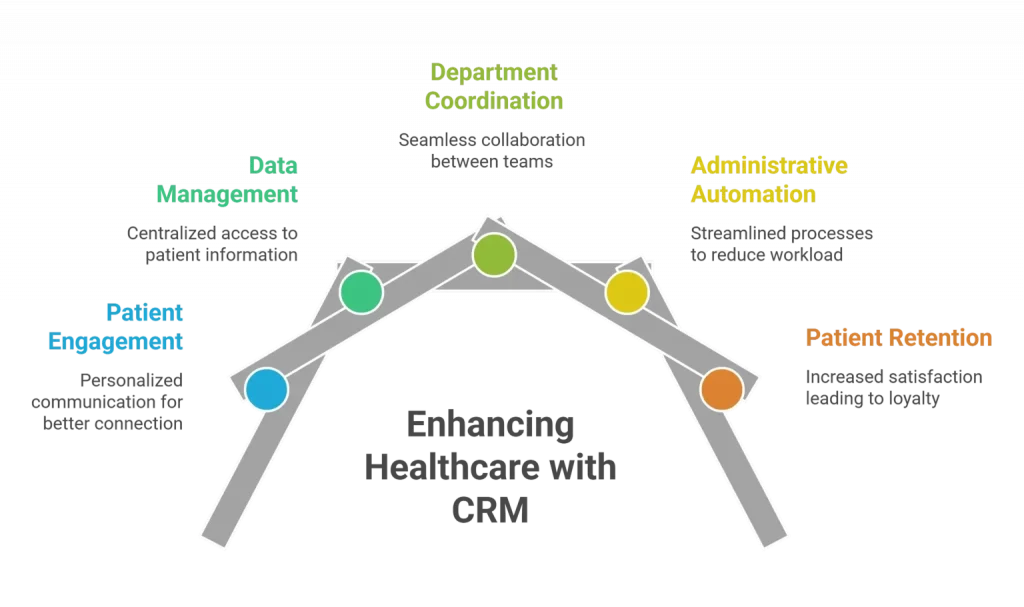
- Improved patient engagement through personalized communication
- Centralized data management for better accessibility
- Enhanced coordination between departments
- Reduced administrative workload through automation
- Higher patient retention and satisfaction
Overall, a CRM helps healthcare providers shift toward proactive and continuous patient care.
What Exactly Does Healthcare CRM Software Do?
Before evaluating any platform, it’s worth being clear on the core functions you should expect:
- Centralized patient records – All contact details, interaction history, appointment records, and notes in one place
- Automated appointment scheduling and reminders – Reduce no-shows with SMS, email, or WhatsApp notifications
- Lead and inquiry management -Capture patient inquiries from multiple channels and route them efficiently
- Post-care follow-ups – Automated check-ins after treatments or procedures
- EHR/EMR integration – Sync clinical data without double entry
- Analytics and reporting – Track engagement metrics, campaign performance, and team productivity
- Multi-channel communication – Email, SMS, WhatsApp, phone, all managed from a single dashboard
- HIPAA-compliant data handling – Non-negotiable for any healthcare organization in regulated markets
Top 10 Healthcare CRM
In today’s digital healthcare landscape, managing patient relationships efficiently is just as important as delivering quality care. A reliable CRM can help streamline communication, improve engagement, and simplify daily operations.
Here’s a curated list of the top healthcare CRM solutions that are making it easier for providers to stay connected, organized, and patient-focused.
1. Quad One Healthcare CRM
Quad One is one of the few CRMs built entirely around the healthcare workflow rather than adapted from a generic sales platform. This makes a meaningful difference in the terminology, the features, and the logic, all of which reflect how healthcare organizations actually operate.
Key Features
• Automated appointment scheduling and multi-channel reminders (SMS, email, WhatsApp)
• End-to-end patient journey tracking from first inquiry to post-treatment follow-up
• Lead management with source tracking for new patient acquisition
• WhatsApp Business integration for real-time patient communication
• Department-wise workflow management
• Customizable reports and engagement dashboards
Strengths
• Healthcare-native design with no need to adapt generic CRM features
Key Features
• Strong automation for routine patient touchpoints
• Suited for both single-specialty clinics and multi-department hospitals
• Shorter implementation time compared to enterprise-grade platforms
2. Salesforce Health Cloud
Salesforce Health Cloud is the gold standard for large healthcare systems that need a highly configurable, feature-rich platform. Built on Salesforce’s CRM infrastructure, it delivers AI-driven insights, unified patient profiles, and sophisticated care coordination tools.
Key Features
• Unified patient profile consolidating clinical and non-clinical data
• AI-powered insights via Salesforce Einstein for predictive care
• Patient journey mapping and milestone tracking
• Care team collaboration tools with role-based access
• HIPAA-compliant data architecture
Strengths
• Unmatched depth of customization and configurability
• Powerful AI and analytics capabilities
• Extensive third-party integration ecosystem
3. Microsoft Dynamics 365
Microsoft Dynamics 365 is a natural choice for providers already using Microsoft 365, Teams, or Azure. The seamless integration across these platforms means your CRM, email, collaboration tools, and cloud infrastructure all work in sync, significantly reducing friction for staff.
Key Features
• Native integration with Outlook, Teams, SharePoint, and Azure
• Patient engagement workflows and automated follow-ups
• Advanced analytics through Power BI
• AI-assisted insights and predictive modeling
• Customizable workflows using Power Automate
• Secure, cloud-based data management with Azure compliance tools
Strengths
• Exceptional interoperability within the Microsoft ecosystem
• Familiar interface reduces staff training time
• Powerful analytics and reporting through Power BI
4. Zoho CRM
Zoho CRM is the go-to choice for healthcare providers who need solid CRM functionality without the enterprise price tag. It’s affordable, easy to set up, and offers a wide range of features that cover most day-to-day patient management needs.
Key Features
• Patient record management and contact tracking
• Automated follow-up sequences and reminders
• Multi-channel communication (email, phone, social)
• Workflow automation for routine administrative tasks
Strengths
• Very competitive pricing, strong value for the feature set
• Intuitive interface with a manageable learning curve
• Wide range of integrations through Zoho Marketplace
5. HubSpot CRM
HubSpot has built its reputation on simplicity. It’s one of the easiest CRMs to get up and running, making it a smart starting point for organizations making their first move away from spreadsheets and scattered inboxes.
Key Features
• Contact and patient record management
• Email marketing and automation sequences
• Appointment scheduling integration
• Live chat and communication tracking
Strengths
• Extremely user-friendly, minimal training required
• Strong free tier makes it accessible for tight budgets
• Excellent library of integrations with third-party tools
6. LeadSquared
LeadSquared positions itself at the intersection of CRM and marketing automation, making it particularly effective for hospitals and specialty clinics actively growing their patient base. It’s built to capture inquiries from every channel and convert them into confirmed appointments efficiently.
Key Features
• Multi-channel lead capture (web forms, ads, phone, social media)
• Automated lead distribution and routing to the right teams
• Patient journey tracking from first touchpoint to appointment
• SMS, email, and WhatsApp automation for follow-ups
• Campaign analytics and ROI reporting
Strengths
• Exceptional lead management and conversion tracking
• Built-in marketing automation reduces dependence on separate tools
• Strong reporting on acquisition channels and campaign performance
7. Freshsales
Freshsales brings AI-driven automation to patient relationship management in a package that doesn’t require a large technical team to operate. It automates the routine so your staff can focus on what actually requires a human touch.
Key Features
• AI-powered lead scoring and contact prioritization
• Built-in phone, email, and chat communication tools
• Automated workflow sequences for follow-ups and reminders
• Visual deal/pipeline management adapted for patient journeys
• Detailed activity tracking and engagement analytics
Strengths
• Strong AI automation that reduces manual workload meaningfully
• Clean, modern interface with good mobile support
• Built-in communication tools mean fewer third-party add-ons are needed
8. Pipedrive
Pipedrive’s defining characteristic is its visual pipeline. This drag-and-drop board makes it easy to see where every patient or lead sits in your workflow at any given moment. Healthcare teams use this logic to track patients through inquiry, consultation, treatment, and follow-up stages.
Key Features
• Visual kanban-style pipeline for tracking patient or lead status
• Customizable stages to match your specific workflow
• Automated activity reminders and follow-up prompts
• Email integration and communication tracking
• Reporting on conversion rates and team performance
Strengths
• Exceptionally easy to use, teams adopt it quickly with minimal training
• Visual pipeline gives immediate clarity on workflow bottlenecks
• Lightweight and fast doesn’t feel bloated or over-complicated
9. Keap
Keap (formerly Infusionsoft) is built for small businesses, combining contact management with marketing automation in a single, cohesive platform. For independent practitioners or small group practices, it helps a lean team punch above its weight.
Key Features
• Contact and patient management with detailed interaction history
• Automated email and SMS sequences for appointment reminders and follow-ups
• Built-in marketing automation with campaign builder
• Payment and invoice integration
• Lead capture forms and landing page builder
• Scheduling integration for appointment booking
Strengths
• Combines CRM and marketing automation, reducing tool sprawl
• Easy to set up automated patient communication campaigns
• Good choice for solo practitioners or small teams without dedicated IT support
10. Creatio CRM
Creatio takes a low-code approach that sets it apart from most CRMs on this list. Instead of adapting a fixed feature set to your processes, you can build and modify workflows directly within the platform, no developer required. This makes it particularly valuable for healthcare organizations with non-standard operational models.
Key Features
• Low-code workflow builder for custom process design
• Case management for complex, multi-step patient interactions
• Omnichannel communication management
• AI-assisted analytics and process recommendations
• Integration capabilities with EHR, billing, and third-party systems
Strengths
• Exceptional flexibility to build workflows that match exactly how your team operates
• Low-code design means customization doesn’t require a development team
• Strong case management tools for complex patient journeys.
Below is the tabular Column, which states the major difference among these Healthcare Companies
Healthcare CRM Software Comparison: Features, AI & Best Use Cases
| Platform | Profile | Best for | Core strength | Automation & AI | Standout advantage | Key limitation |
|---|---|---|---|---|---|---|
| Quad One | Healthcare-native | Clinics and hospitals wanting a no-adaptation CRM | End-to-end patient journey with WhatsApp, SMS, and email reminders | Automates reminders, follow-ups, and department workflows | Only CRM built around healthcare from the ground up | Fewer third-party integrations than enterprise rivals |
| Salesforce Health Cloud | Enterprise | Large health systems needing deep customization | Unified patient profile across clinical and non-clinical data | Einstein AI for predictive care and next-best actions | Most configurable platform available | High cost and admin-heavy |
| Microsoft Dynamics 365 | Microsoft ecosystem | Organizations already using Microsoft tools | Patient workflows synced with Teams and Outlook | Power Automate + Microsoft AI insights | Familiar interface reduces training time | Weak fit outside Microsoft ecosystem |
| Zoho CRM | SMB / budget | Cost-conscious clinics | Records, follow-ups, and communication tools | Workflow automation with lighter AI | Strong value for money | Not healthcare-specific |
| HubSpot CRM | SMB / budget | First-time CRM adopters | Email automation and scheduling | Light AI + email sequences | Easy onboarding and free tier | Gets expensive at scale |
| LeadSquared | Marketing-first | Growing clinics focused on acquisition | Multi-channel lead capture and routing | Built-in WhatsApp, SMS, email automation | Strong lead-to-appointment conversion | Overkill for low-growth clinics |
| Freshsales | AI-led | Automation-focused teams | AI-scored leads and prioritization | Automated sequences and AI scoring | Built-in phone, email and chat | Less advanced than Salesforce |
| Pipedrive | Visual pipeline | Teams needing stage visibility | Drag-and-drop workflow boards | Automated reminders | Very fast adoption | Limited clinical workflow depth |
| Keap | SMB / budget | Independent practitioners | CRM + marketing + billing | Campaign automation | Reduces tool sprawl | Can feel limiting as teams grow |
| Creatio CRM | Low-code | Custom workflow organizations | Low-code process builder | AI recommendations and alerts | Highly customizable | Setup takes time |
Conclusion:
In today’s fast-evolving healthcare environment, adopting a robust CRM system is no longer optional; it’s essential for delivering efficient, patient-centered care. From managing complex patient data and streamlining daily operations to enhancing engagement and enabling personalized services, healthcare CRM solutions play a critical role in improving both clinical and operational outcomes.
The right CRM not only simplifies workflows but also empowers healthcare providers with real-time insights, better communication tools, and stronger marketing capabilities. When combined with evolving digital solutions like telehealth and telemedicine, CRM systems help create a more connected, responsive, and accessible healthcare ecosystem.
External References
Top 5 CRM Software For Healthcare
Hospitals are under pressure to expand access, improve patient experience scores, and operate with fewer manual steps. A modern hospital CRM ties together communications, preferences, and feedback with clinical context to make every touchpoint timely, relevant, and safe. Evidence shows that engaging patients and families improves safety and quality, and that systematic measurement via HCAHPS (Hospital Consumer Assessment of Healthcare Providers and Systems) directly links experience to reputation and reimbursement.
This guide walks through how a hospital CRM works across the full patient journey, how it maps to HCAHPS domains, what interoperability looks like in practice, and how to measure what matters. Whether you are evaluating CRM platforms for the first time or looking to tighten your existing patient engagement workflows, every section below is designed to be actionable.
Key Takeaways
- CRM vs. EHR: The EHR is the clinical system of record. The CRM is the engagement engine that communicates and acts on that truth.
- Beyond Marketing: A hospital CRM is an operational tool for scheduling, pre-visit preparation, in-visit communication, post-discharge follow-up, and service recovery.
- Measurable Impact: The right CRM strategy delivers direct gains in no-show rates, HCAHPS scores, and referral-to-appointment times.
What Is the Difference Between a Hospital CRM and an EHR?
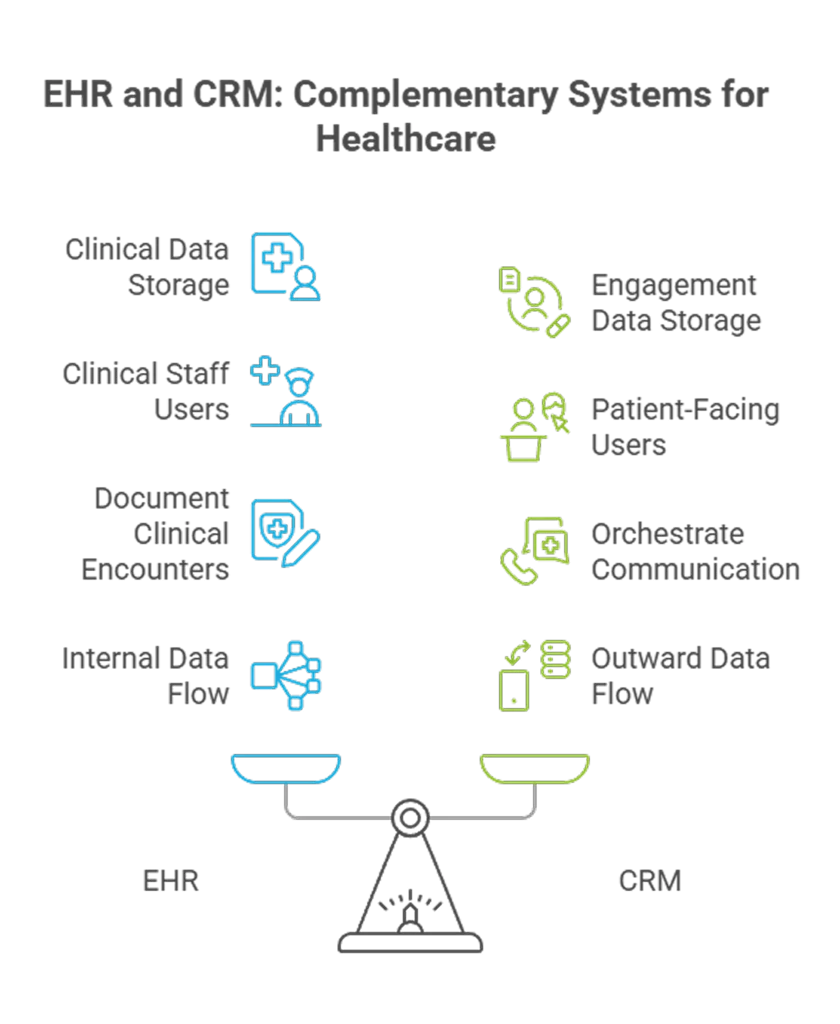
Think of the Electronic Health Record (EHR) as the clinical source of truth. It stores diagnoses, medications, lab results, and care plans. A hospital CRM, on the other hand, is the engagement engine that orchestrates communication and service recovery around that clinical truth.
A fit-for-purpose CRM listens for events (appointment booked, order placed, discharge complete) and triggers the right message on the right channel with full auditability. The EHR tells you what happened clinically. The CRM decides what to say, when, and how.
An AI-powered hospital CRM takes this further by using machine learning to personalize message timing, channel selection, and content based on each patient’s history and preferences.
Strong patient data management links identity, language, consents, and social context to clinical milestones. This enables personalized patient care without oversharing Protected Health Information (PHI). Omnichannel programs covering SMS, WhatsApp, email, IVR, and patient portals should be throttled by audience, timing, and sensitivity.
How Does a Hospital CRM Improve the Patient Journey?
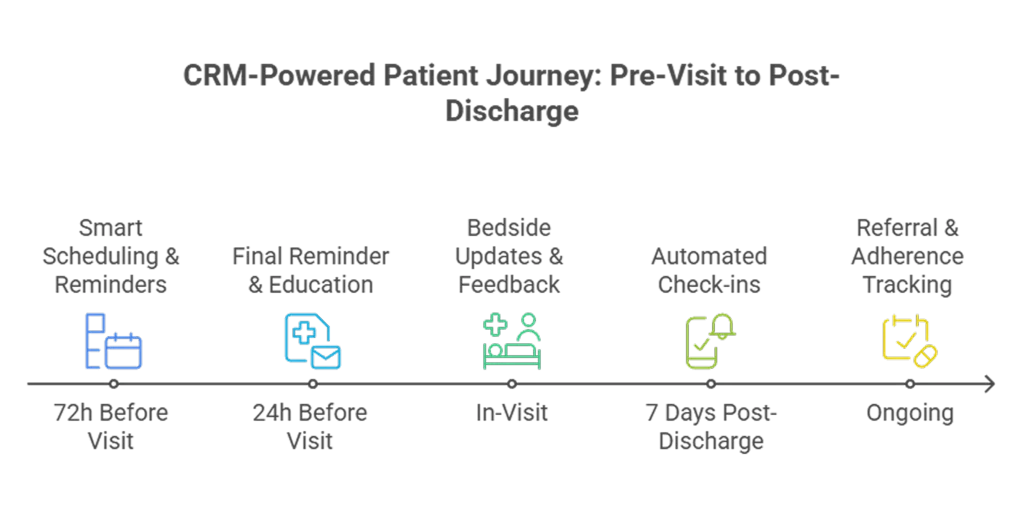
Patient journey tracking means each step, from referral received to appointment scheduled, visit completed, and results posted, can trigger a contextual nudge. That is modern healthcare workflow automation: rules and AI work in the background so humans can focus on conversations that need a human.
Pre-Visit: Scheduling, Reminders, and Preparation
Multi-touch reminder schedules (for example, 72 hours and 24 hours before the visit) adapt when a patient confirms or reschedules. Smart waitlists auto-offer open times as they become available, matched to each patient’s channel preference. “One-tap change” links let patients who cannot make it reschedule without calling. Together, these moves reduce no-shows and late cancellations while preserving clinic capacity.
A CRM can also sequence education in plain language, capture questions ahead of time, and route special needs (such as interpreter or mobility support) to staff. These are practical CRM healthcare benefits that show up as fewer delays and better first impressions.
In-Visit: Communication and Family Engagement
Bedside updates to families, “teach-back” prompts before discharge, and role-based alerts help teams close information gaps. AHRQ’s guidance on partnering with patients and families has shown measurable improvements in safety culture and experience when applied consistently. A CRM operationalizes that playbook.
For hospitals looking to extend real-time communication beyond the facility, WhatsApp patient communication integrated with the CRM enables secure, asynchronous messaging that patients already trust and use daily.
Post-Discharge: Follow-Ups, Referrals, and Medication Adherence
Seven-day check-ins, refill reminders, and referral tracking keep momentum after discharge. WHO and AHRQ emphasize that transitions are fragile: medication discrepancies and communication failures are common. Structured follow-ups are not optional. A CRM makes these steps predictable, documented, and visible to the team responsible for closing the loop.
How Does Hospital CRM Improve HCAHPS Scores?
HCAHPS remains the national, standardized barometer for hospital patient experience. Scores are publicly reported and directly tied to Medicare reimbursement through the Value-Based Purchasing (VBP) program. The hospital’s Customer Relationship Management (CRM) can systematically move the needle on multiple HCAHPS domains.
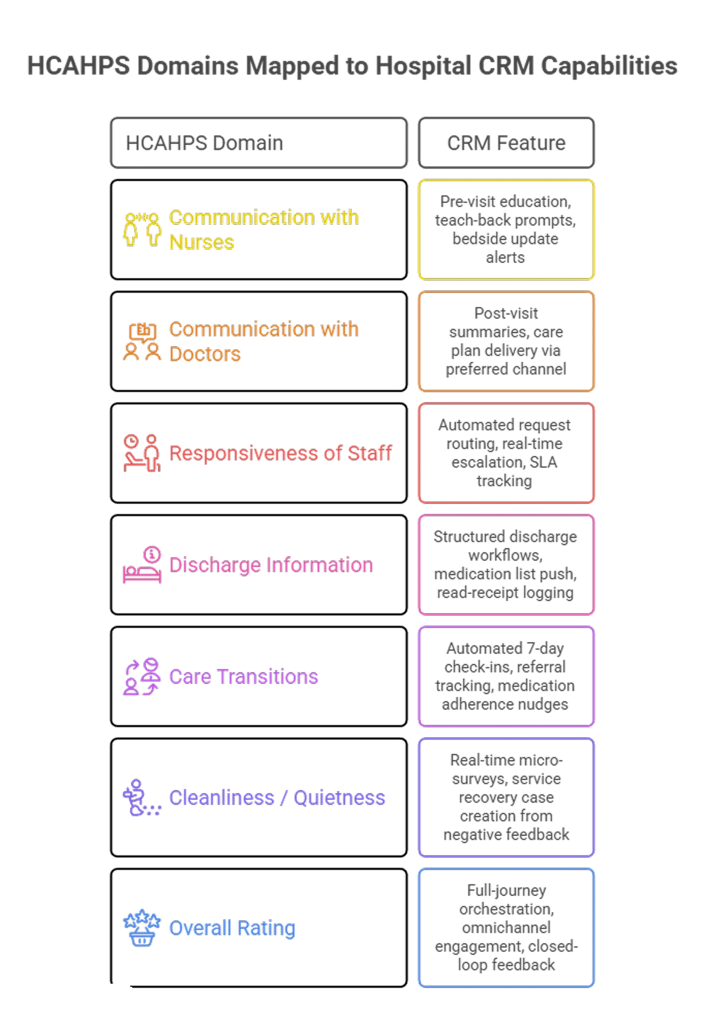
Communication with Nurses and Doctors: The CRM ensures pre-visit prep materials reach patients before they walk in, so clinical conversations start from a shared baseline. Post-visit summaries and teach-back prompts reinforce understanding.
Responsiveness of Hospital Staff: Automated routing of patient requests and real-time escalation alerts reduce response lag. When a patient presses a call button or submits a concern via the portal, the CRM assigns it, tracks it, and timestamps it.
Discharge Information: Structured discharge workflows push medication lists, follow-up appointments, and warning signs through the patient’s preferred channel. The CRM confirms receipt and logs read status.
Care Transitions: Post-discharge follow-up sequences, triggered automatically based on diagnosis and risk score, close the loop on referrals, medications, and home care instructions.
Hospitals investing in CRM-driven patient engagement are already seeing returns. Learn more about the future of AI in hospital CRM and how predictive analytics are being layered on top of these workflows.
How Do You Integrate Hospital CRM with EHR Using FHIR and HL7?
Interoperability standards such as HL7 and FHIR (Fast Healthcare Interoperability Resources) enable data to move safely between systems. FHIR defines resources and formats so apps, portals, and contact centers can share the same core data without brittle, one-off interfaces.
In practice, integration works through event-driven triggers. When a clinical event fires in the EHR (a new appointment, a lab result, a discharge order), the CRM receives a FHIR notification, evaluates the patient’s communication preferences and consent status, and fires the appropriate workflow. This is not a nightly batch export. It is a real-time, bidirectional data flow.
Key integration touchpoints include: appointment scheduling (ADT messages via HL7 or FHIR Encounter resources), lab result availability (FHIR DiagnosticReport), discharge events (FHIR Encounter status change), and referral orders (FHIR ServiceRequest). Each touchpoint triggers a specific CRM workflow: reminders, result notifications, discharge instructions, or referral follow-ups.
The goal is a single patient record that spans clinical and engagement data. No duplicate entry, no stale information, and no manual handoffs between systems.
How Does Service Recovery Work in a Hospital CRM?
Closed-loop service recovery, acknowledging concerns, solving them, and confirming satisfaction, turns detractors into advocates. Routing and Service Level Agreements (SLAs) matter: when a low score or negative comment arrives, your CRM should create a case, assign ownership, and track resolution to protect HCAHPS domains (communication, responsiveness, discharge information, cleanliness, and more).
The workflow typically follows four steps. First, Detect: real-time micro-surveys and NPS prompts surface issues while the patient is still in the facility or within the first 48 hours post-discharge. Second, Route: the CRM assigns the case to the right department or individual based on issue type, severity, and location. Third, Resolve: the assigned owner acknowledges the concern, documents the action taken, and communicates the resolution back to the patient. Fourth, Close: the system logs the outcome, updates HCAHPS-linked dashboards, and triggers a satisfaction confirmation.
Hospitals that treat service recovery as a structured, CRM-managed process see measurably fewer negative HCAHPS responses. Patients who receive a timely acknowledgment and resolution are far less likely to rate the hospital negatively.
What Metrics Should a Hospital CRM Dashboard Track?
Dashboards must show interventions and results in the same view: reminders sent mapped to attendance delta, education sent mapped to prep completion, and recovery cases opened mapped to HCAHPS movement. That is CRM patient management with accountability.
Core metrics to track include: time to next available appointment and waitlist fill rates; HCAHPS top-box scores by domain alongside response rates to micro-surveys; patient portal and app monthly active users with completion of pre-visit tasks; service recovery throughput covering time to acknowledge and time to resolve; post-discharge follow-up completion and time to callback; referral turnaround from received to attended; and medication adherence prompts opened versus acted on.
Go beyond vanity metrics. Establish baselines and control cohorts before turning on a program. Use A/B testing for message timing, channel, and copy to continuously optimize. Systematic reviews show portals can improve patient knowledge and efficiency, but clinical endpoints are mixed without active engagement, so measure the operational steps that drive outcomes.
Compliance and Data Privacy in Hospital CRM
Modern, HIPAA-compliant CRMs enable secure texting of patient privacy and information, but this requires strict adherence to security rules, robust consent management, and audit trails. Prefer platforms that make “minimum necessary” the default, surface consent state at the moment of send, and log every access. That is how you turn policy into practice and maintain trust in patient relationship management.
An AI-powered hospital CRM with built-in compliance guardrails automates consent tracking, encrypts data at rest and in transit, and generates audit-ready reports for regulatory reviews.
Conclusion:
It is time to treat patient communications and service recovery as core clinical infrastructure. With the right hospital CRM, hospitals can make every touchpoint simpler and safer, align programs to national measures, and build trust at scale.
Start with targeted reminders and discharge follow-ups. Wire in feedback with SLAs. Keep expanding the playbook. The result is a smoother journey, stronger patient engagement, and a system that learns from every interaction.
Book a hospital CRM demo to see how Quad One’s AI-powered CRM connects scheduling, follow-ups, feedback loops, and HCAHPS measurement into one engagement engine.
